By ScoreGap Research
How to Keep a Wrong Answer Journal for the LSAT
Build an LSAT wrong answer journal you will maintain. What to track, the common mistakes, and how to automate the data entry.
The practice test itself is not where you learn. The test is data collection. The learning happens afterward, when you sit down with your wrong answers and figure out exactly why you got them wrong.
Students who take test after test without real review tend to plateau. Students who review each test deeply improve on fewer tests. A wrong answer journal is what makes that review systematic.
Why an LSAT® wrong answer journal works
Every wrong answer on the LSAT® has a story. You didn't just "get it wrong." You made a specific reasoning error. Maybe you confused a sufficient condition for a necessary one. Maybe you fell for an answer that was too strong when the stimulus only supported something moderate. Maybe you misread the question stem entirely and answered the wrong question.
If you don't write that story down, you'll make the same mistake again. And again. The LSAT® is remarkably consistent in how it tests reasoning skills. The same trap answers show up across tests because they exploit the same cognitive shortcuts. A wrong answer journal forces you to identify your specific failure points so you can actually fix them.
Think of it this way: if you took a practice test, scored a 158, and moved on to the next one, you discarded an entire study session. You generated valuable diagnostic information about your reasoning gaps and then ignored it.
What to track in your journal
An effective wrong answer journal captures five things for every question you got wrong:
1. The basics. Test name, section, question number, and question type. This sounds obvious, but the question type is critical. You need to know whether you're missing Flaw questions, Necessary Assumption questions, or Strengthen questions, because the fix is different for each one.
2. What you picked and why. This is the most important field and the one people most want to skip. Write down exactly why the wrong answer was attractive to you. "It sounded right" isn't good enough. Was it because the answer used language from the stimulus? Because it felt like it addressed the conclusion? Because you were rushing and it was the first answer that seemed reasonable? Be honest. This is where the pattern recognition comes from.
3. Why the right answer is right. Force yourself to articulate the logic. If you can't explain why the correct answer is right in plain language, you don't actually understand the question. You just know which bubble to fill in.
4. Difficulty level. Was this a 1-star question that you should never miss, or a 4-star question that most people get wrong? Missing easy questions is a very different problem than missing hard ones. Easy misses are usually about carelessness or pacing. Hard misses are about skill gaps.
5. What you'll do differently. This is your action item. "Read the question stem first." "Check for the sufficient/necessary reversal." "Slow down on the last five questions of LR instead of rushing." Without this field, your journal is a record of failure. With it, it's a training plan.
For a ready-to-use version of this structure with example entries, see our LSAT wrong answer journal template.
The manual approach
Most people start with a spreadsheet. Here's a basic template with one filled-out row:
| Question | Yours → Correct | Why You Picked Yours | Why Theirs Is Right | What To Do Next Time |
|---|---|---|---|---|
| PT 92 · LR · Q14 Flaw | B ✗ → D ✓ | B described a real flaw but not the targeted one, stopped reading after finding one match | D identifies correlation ≠ causation; stimulus never rules out common cause | Check that my flaw description matches the answer choice precisely before committing |
You can add columns for difficulty level, time spent, confidence level, or whatever else helps you track patterns. Some people add a "flag for review" column so they can mark questions they want to revisit before their next PT.
This approach works. It's exactly how top scorers have been reviewing for years. But there's a problem.
Why most people quit after two tests
Building a wrong answer journal manually takes a long time. After a full-length PT, you're looking at anywhere from a dozen to 30 or more wrong answers in the 155–165 range. For each one, you need to go back to the test, re-read the stimulus, check the correct answer, look up the question type, and then write your analysis.
That's 45 minutes to an hour of administrative work before you even start the actual reflection. Per test.
Most serious LSAT® students take at least 10–15 full-length practice tests during their prep, and many take 20 or more. At 45 minutes each, that's 7 to 15 hours of data entry, just to populate the journal. Not to study patterns, not to plan drills, just to build it.
This is why the vast majority of people who start a wrong answer journal abandon it within two tests. The setup cost is too high. They know review matters, they start with good intentions, and then the friction wins. They go back to taking PTs without properly reviewing, and they plateau.
"Just push through it" is bad advice when the friction is removable.
The automated approach
The data entry part of a wrong answer journal (capturing which questions you got wrong, the question type, difficulty, what you picked versus the correct answer) is entirely mechanical. It doesn't require any thought or analysis. It's just copying information from one place to another.
That's the part that should be automated. The reflection (why you picked the wrong answer, why the right answer is right, what you'll do differently) is the part that requires your brain. That's the part that actually produces learning.
This is the problem ScoreGap solves. It's a Chrome extension that captures your LawHub practice test data automatically, every wrong answer, question type, difficulty level, section, and time data. Your journal is populated the moment you finish a test.
The Review Panel opens as a side panel right alongside your LawHub score report, no tab switching, no copy-pasting into a separate app. Every wrong answer is pre-populated with your answer, the correct answer, question type, difficulty, and time spent. The five things described above are condensed into three guided reflection fields that capture the essentials: why you picked your answer, why the correct answer works, and what you'll do differently. (The basics (question type, difficulty, answers) are already filled in for you.)
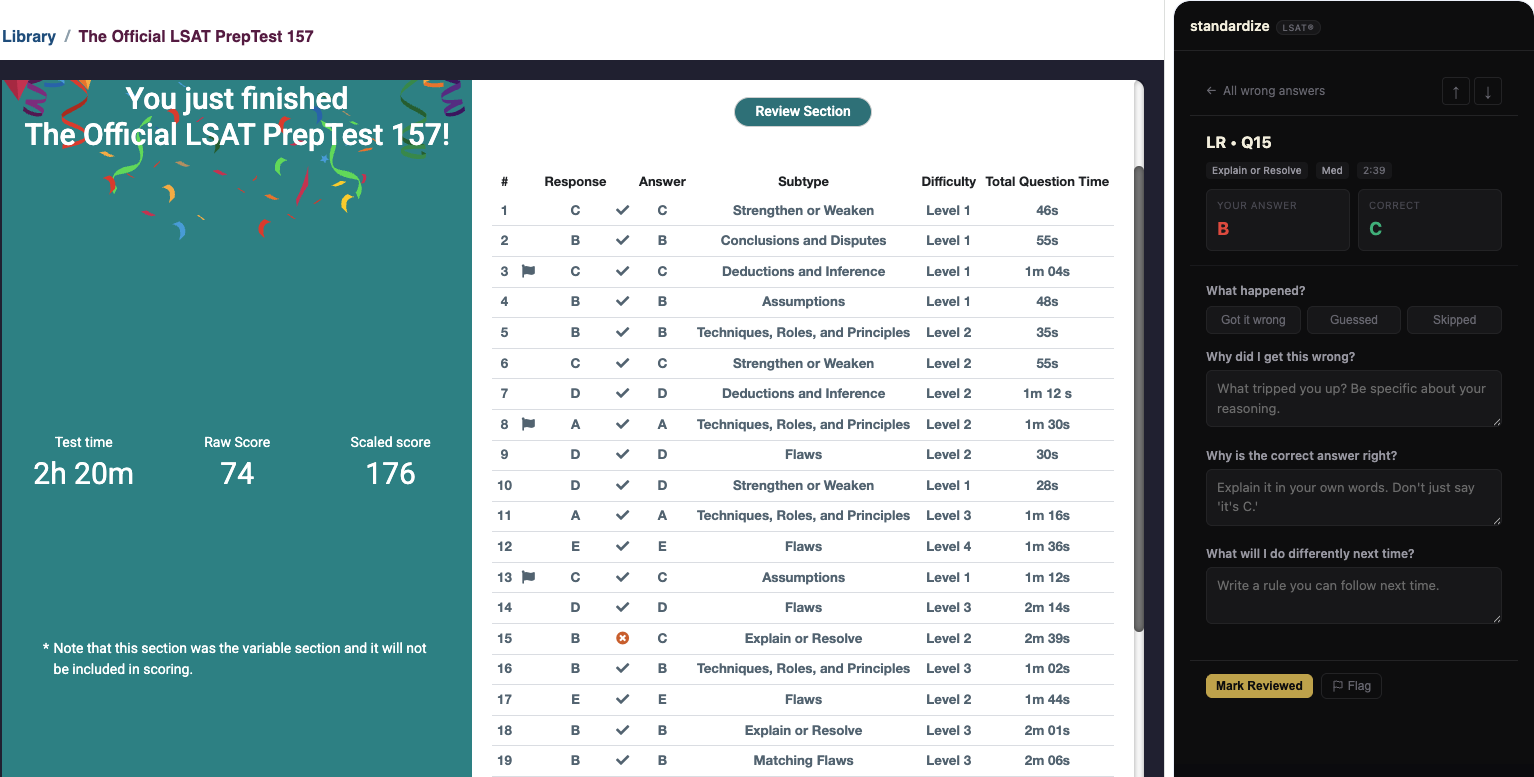
Those three prompts map to the same error analysis loop described above: classify the error, engage with the correct reasoning, commit to a specific change. The structure keeps you honest when you'd rather just skim and move on.
Tips for effective journal review
Having a journal is only valuable if you actually use it. Here's how to get the most out of yours.
Review before every PT. Spend 15 minutes reading through your journal entries from the last two or three tests before you sit down for a new one. This primes your brain to watch for the patterns you've been falling into. It's the difference between knowing you struggle with Necessary Assumption questions and actively thinking about it during the test.
Focus on patterns, not individual questions. One wrong Flaw question doesn't mean anything. Seven wrong Flaw questions across three tests means something. Look for clusters. Are you consistently missing the same question type? The same difficulty level? The same section? The patterns are where the study plan writes itself.
Track your progress over time. This is where the journal becomes most useful, and where tracking your progress systematically starts to matter. If you identified Parallel Reasoning as a weakness three tests ago and you've been drilling it, you should be able to see your accuracy improving. If it hasn't budged, your drill approach isn't working and you need to change your strategy. Without the journal, you'd never know.
Don't skip the easy misses. Everyone wants to analyze the hard questions they got wrong. But the easy misses, the 1- and 2-star questions, are the cheapest points to win back. These are questions you already have the skills to answer correctly. You're losing points to carelessness, misreading, or pacing errors. Those are the most fixable problems you have.
Be brutally honest in your reflections. "I didn't read carefully enough" is a useless journal entry. "I read 'some' as 'all' and negated the necessary condition" is useful. The more specific you are about what went wrong, the more likely you are to catch it next time.
How long should each entry take?
Aim for 2–3 minutes per question. If you're spending 10 minutes on a single entry, you're overcomplicating it. The point is to identify the error pattern and commit to a specific change, not to write a dissertation. A clear, honest sentence for each of the three reflection fields is more valuable than a paragraph of vague analysis.
For a 15–20-question wrong answer journal, that's about an hour of focused reflection per test.
Start now
If you've already taken practice tests without journaling, that data isn't gone, go back and review your last two PTs now. If you haven't started yet, build the habit from your very first scored test. (Prepping for a 2026 sitting? See what changes with the in-person LSAT® format in August 2026.)
If the manual approach works for you, use it. A spreadsheet and discipline will get you there. If the data entry friction has stopped you before, or if you want to spend your time on reflection instead of transcription, start your automated wrong answer journal free at scoregap.com.
FAQs
How is a wrong answer journal different from just redoing questions I missed?
Redoing a question only tells you the right letter; a journal records why you fell for the wrong one. Each entry captures why you picked your answer, why the correct answer works, and what you'll change. That written reasoning across three reflection fields is what stops you repeating the same trap.
Does keeping a wrong answer journal actually raise your LSAT score?
A journal is a review method, not a guarantee. The gain comes from honest, specific reflection, not the document itself. Students who review each test deeply tend to get more out of each one than unreviewed prep gets out of a much larger pile.
How should I start a wrong answer journal if I haven't journaled before?
If you've already taken practice tests, that data isn't gone. Go back and review your last two practice tests now, logging every wrong answer with its question type and difficulty level. If you haven't started yet, build the journaling habit from your earliest scored test rather than waiting.
How often should I review my LSAT practice tests and journal entries?
Review your journal before every practice test, spending about 15 minutes reading entries from your most recent tests. This primes you to watch for recurring traps during the exam. The goal is spotting patterns across tests, like the same question type missed repeatedly, not re-reading single questions in isolation.
How long should it take to log each wrong answer?
Aim for roughly three minutes per question. If you're spending far longer on a single entry, you're overcomplicating it; the point is to name the error pattern and commit to a specific change, not write a dissertation. One clear, honest sentence per reflection field beats a vague paragraph.